
System state control
Each run level defines what services and users are allowed – from maintenance mode to full production.
Solaris · Lesson
Solaris · Run Levels
Run levels control the overall state of a Solaris system: from halt (0) to single-user (S) to full multi-user with networking (3) and reboot (6). Modern Solaris uses SMF milestones internally, but run levels are still important for administration, troubleshooting and interviews.
components/solaris/solarisLessons.js.Traditional UNIX and Solaris use run levels to define system state. Each run level represents a specific combination of started/stopped services and available functionality (single-user, multi-user, networking, etc.).
Each run level defines what services and users are allowed – from maintenance mode to full production.
Changing run level transitions the system between states (e.g. 3 → S for maintenance).
On Solaris 10/11, run levels are implemented internally using SMF milestones.
Replace the image URL below with your Cloudinary link to show a diagram of run levels (0, S, 1, 2, 3, 4, 5, 6) and transitions.
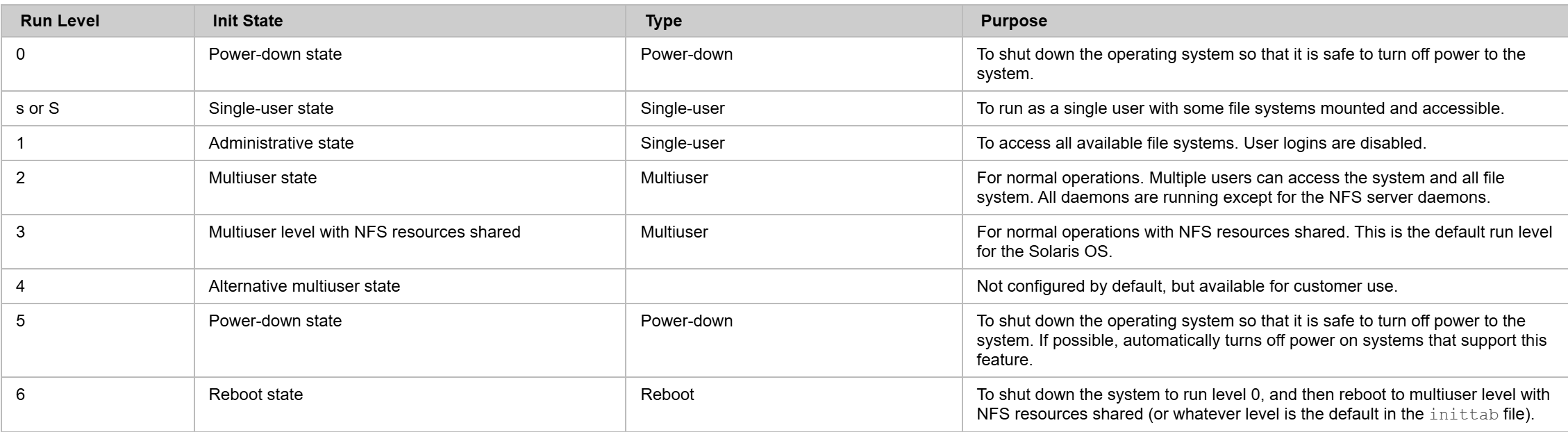
Run Level
0
Halt
OS is down; system stopped. Safe to power off.
Run Level
s / S
Single-user / Maintenance
Minimal environment, root only, for maintenance.
Run Level
1
Single-user (legacy)
Historically similar to S; rarely used on modern Solaris.
Run Level
2
Multi-user (no network)
Multiple users, basic services, usually minimal or no network.
Run Level
3
Multi-user with networking
Normal server mode: multi-user + network services (default).
Run Level
4
Unused / Custom
Site-specific usage if configured; often unused.
Run Level
5
Power down
Shut down and power off (ACPI-supported systems).
Run Level
6
Reboot
Graceful reboot; system restarts.
In modern Solaris, you usually use shutdown to move between run levels cleanly, and who -r to check current run level. init calls are still supported and commonly used in scripts.
Shows current run level and previous run level with time since change.
-i selects target run level, -g is grace period (seconds), -y auto-confirm.
init directly changes run level; usually use shutdown for planned changes.
Single-user mode is for maintenance; only root is allowed and many services are offline.
System halts, can be powered off safely.
Under the hood, Solaris 10/11 use SMF (Service Management Facility) and milestones to control system state. Run levels are mapped to SMF milestones like:
You can inspect SMF milestones and services with:
shutdown -iX -gN -y instead of direct init X (it gives users/applications time to exit).pre-post-check steps you defined in the previous lesson.Once you understand run levels clearly, boot troubleshooting and maintenance activities become much easier.