Solaris · Patch Management

Solaris · Lesson 23

Patch Management

Patching in Solaris 11 is done using IPS and SRU repositories. In this lesson you'll see what patches are, why we apply them, how base and SRU repos work, how publishers are configured, and how boot environments make patching safer.

Patching – what, why, how in Solaris 11

In Solaris 11, patching is done via Image Packaging System (IPS) and Support Repository Updates (SRUs), not traditional patch numbers only. An SRU is a tested bundle of fixes released regularly by Oracle.

What

Patching = updating packages that make up the OS image, usually via a new SRU level.

Why

Security fixes, bug fixes, new features, and staying within supported configurations.

How

Download SRU repo, configure publisher, run dry-run, then final pkg update into a new boot environment.

Base repository, SRU repository and publishers

Base repo

  • Usually Oracle network repository (pkg.oracle.com) or ISO/DVD repository.
  • Provides initial OS image and sometimes older SRU levels.
  • Publisher name is typically 'solaris'.

SRU repo

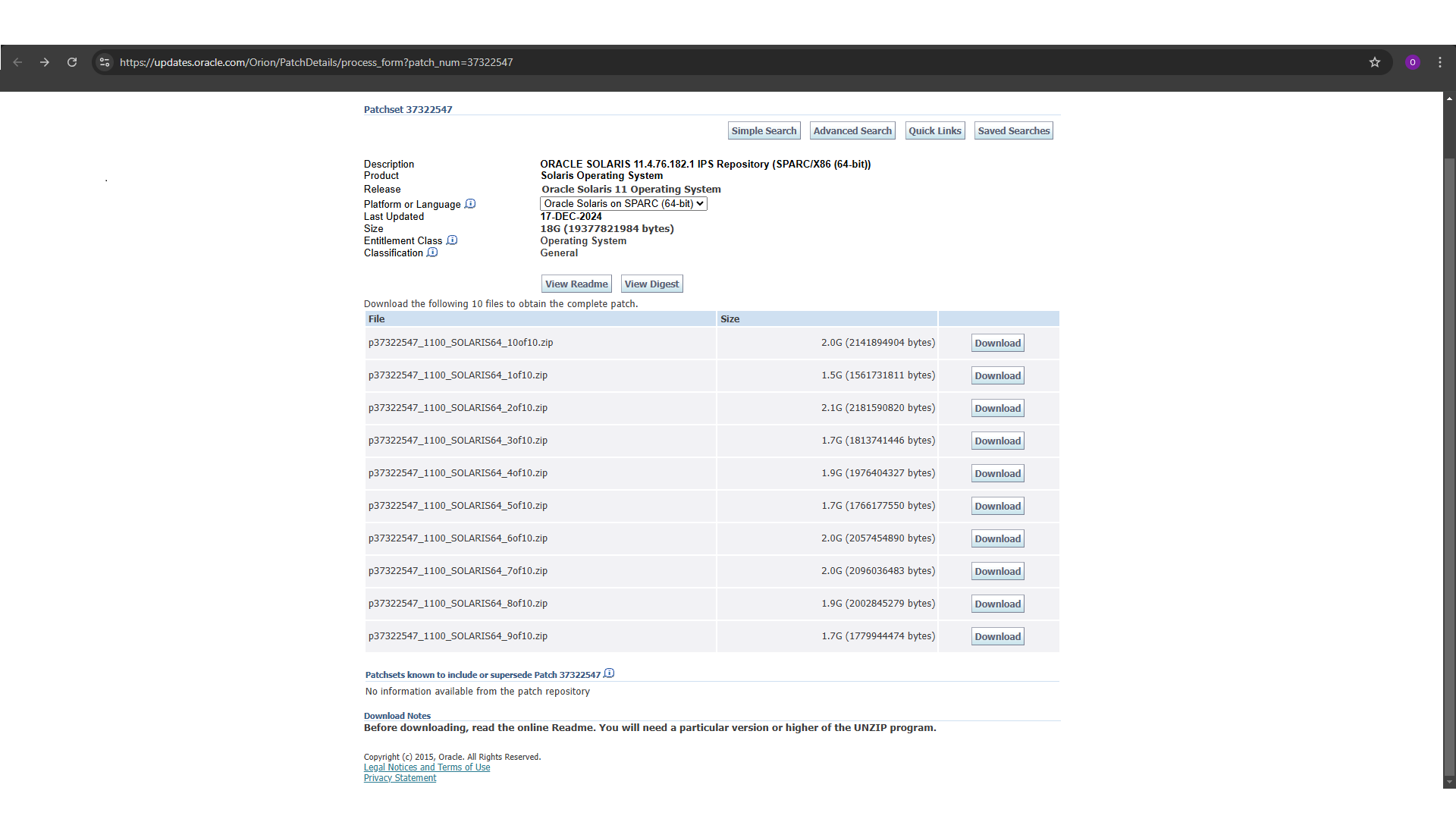
  • Downloaded from My Oracle Support as zipped repo bundles.
  • install-repo.ksh builds a local IPS repo directory (e.g. /opt/SRU11.4.76).
  • You point the 'solaris' publisher to this local file:/// repo before pkg update.

Publisher – what is it?

A publisher is the identity of a software source (e.g. solaris). It defines from where IPS fetches packages.

Publisher – how to control

Use pkg publisher to view, pkg set-publisher and pkg unset-publisher to change origins and priorities.

How to download SRU bundle from My Oracle Support (visual guide)

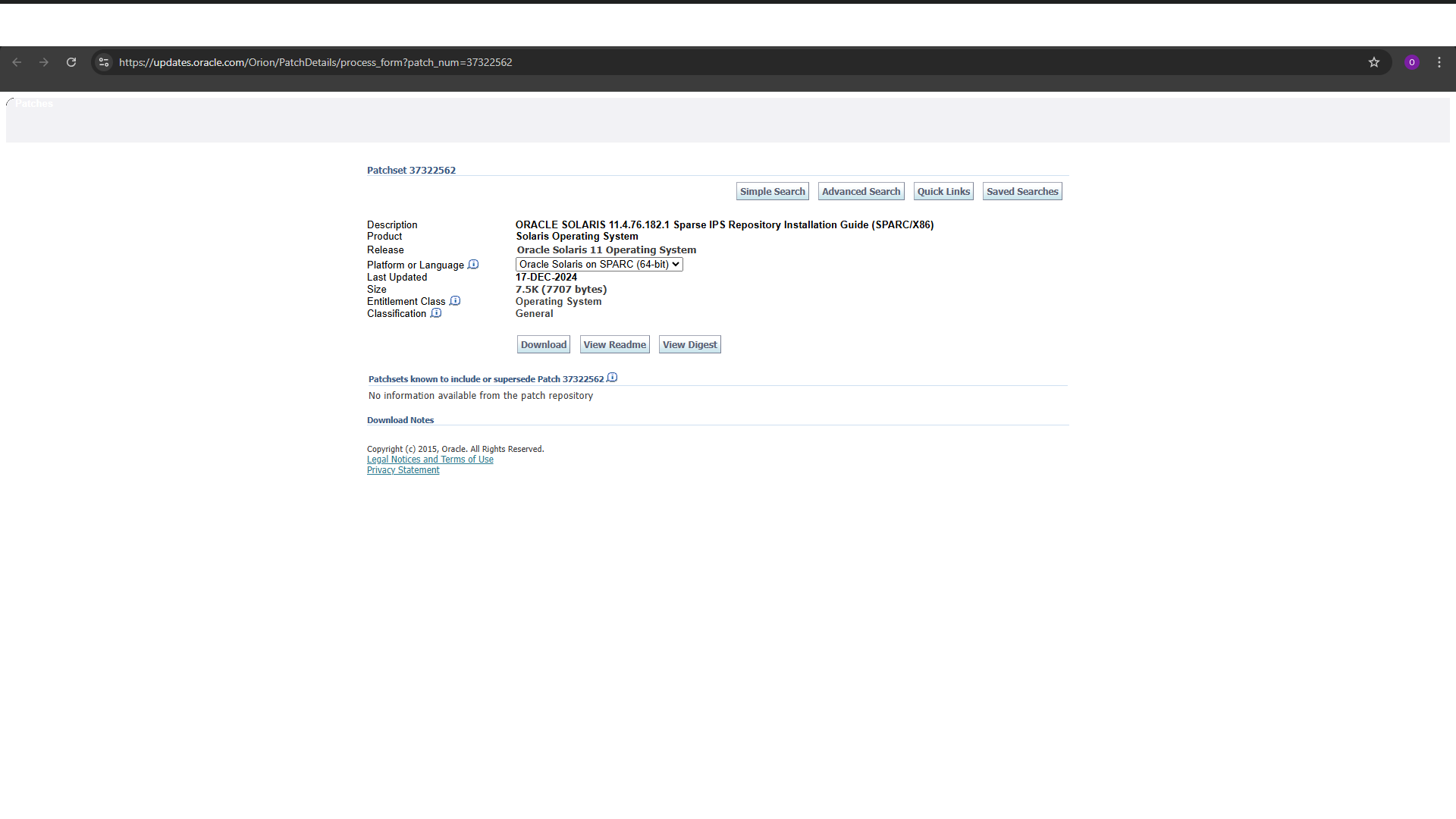
You can use screenshots here to show the MOS flow: login, go to Patches & Updates, search for SRU ID, download zipped repo, verify checksum, etc.
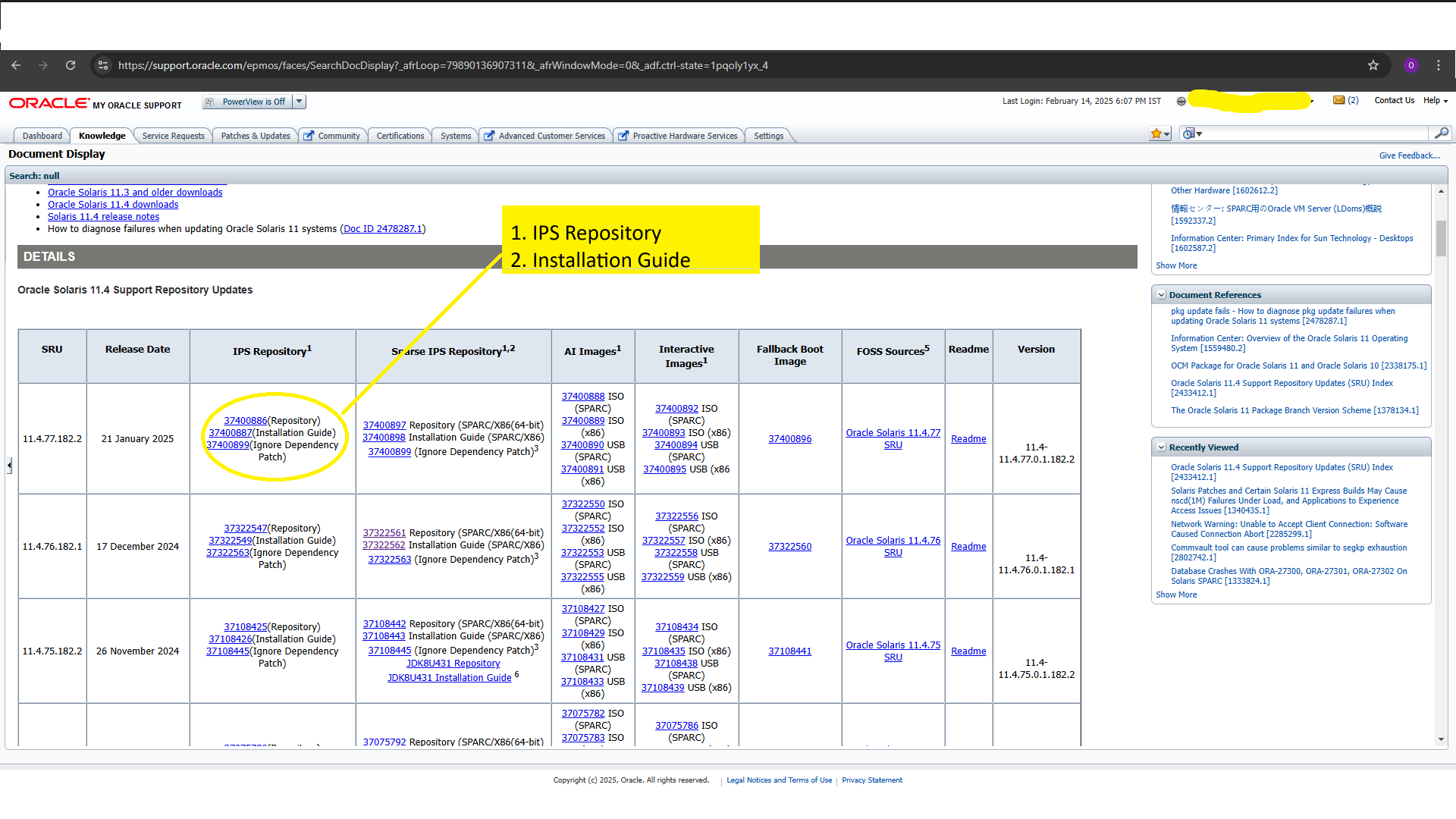
My Oracle Support - search SRU
Download zipped SRU repository

If you have a custom ShowerHead component, you can move these images and title into that component and pass your Cloudinary URLs through props.

Boot Environment (BE) – what and how

A Boot Environment (BE) is a ZFS clone of the root filesystem used at boot. When you run pkg update, Solaris automatically creates a new BE and patches that copy. This makes patching much safer.

Key points about BE

  • Old BE remains untouched (rollback possible).
  • New BE is created and activated during pkg update.
  • Next reboot uses the new BE; old one can be booted again if required.

Basic BE commands

  • beadm list → list all BEs
  • beadm create <name> → manual BE (before risky change)
  • beadm activate <name> → mark BE for use at next boot

Full SRU patch flow – step by step (with dry run)

These examples follow a typical offline patching flow using a local SRU repo downloaded from My Oracle Support.

1. Pre-checks: current OS level, BE and IPS state

Always capture current Solaris version, boot environments and IPS state before patching.

terminal — patch
solaris-lab
[root@localhost:~]# uname -a
SunOS sol11 5.11 11.4.41.111.0 i86pc i386 i86pc
 
# List boot environments
[root@localhost:~]# beadm list
BE Active Mountpoint Space Policy Created
solaris NR / 12.5G static 2024-01-10 10:15
solaris-backup - - 10.2G static 2023-12-01 08:00
 
# Check IPS 'entire' package (constrains system version)
[root@localhost:~]# pkg list -v entire
NAME (PUBLISHER) VERSION IFO
entire 11.4-11.4.41.111.0.1.0.0.0.0 i--

2. Extract SRU zipped repo from My Oracle Support

Downloaded SRU from MOS arrives as a single zip. Unzip it to see README and install-repo script.

terminal — patch
solaris-lab
[root@localhost:~]# unzip p37322549_1100_SOLARIS64.zip
Archive: p37322549_1100_SOLARIS64.zip
inflating: README-zipped-repo.txt
inflating: install-repo.ksh
inflating: sol-11_4_76_182_1-incr-repo_digest.txt
inflating: sol-11_4_76_182_1-readme.html
inflating: sol-11_4_76_182_1-readme.txt

3. Run install-repo.ksh to build local SRU repo

The install-repo script uncompresses multiple zip parts and creates a local IPS repository directory.

terminal — patch
solaris-lab
[root@localhost:~]# ./install-repo.ksh -d /opt/SRU11.4.76
Using p37322547_1100_SOLARIS64 files for sol-11_4_76_182_1-incr-repo download.
Uncompressing p37322547_1100_SOLARIS64_1of10.zip...done.
Uncompressing p37322547_1100_SOLARIS64_2of10.zip...done.
Uncompressing p37322547_1100_SOLARIS64_3of10.zip...done.
Uncompressing p37322547_1100_SOLARIS64_4of10.zip...done.
Uncompressing p37322547_1100_SOLARIS64_5of10.zip...done.
Uncompressing p37322547_1100_SOLARIS64_6of10.zip...done.
Uncompressing p37322547_1100_SOLARIS64_7of10.zip...done.
Uncompressing p37322547_1100_SOLARIS64_8of10.zip...done.
Uncompressing p37322547_1100_SOLARIS64_9of10.zip...done.
Uncompressing p37322547_1100_SOLARIS64_10of10.zip...done.
Repository can be found in /opt/SRU11.4.76.

4. Check current publishers (base vs SRU repo)

Publishers tell IPS where to fetch packages from (Oracle network repo, local DVD, local SRU repo, etc.).

terminal — patch
solaris-lab
[root@localhost:~]# pkg publisher
PUBLISHER TYPE STATUS P LOCATION
solaris origin online F https://pkg.oracle.com/solaris/support/

5. Point solaris publisher to local SRU repo

Use file:// URI pointing to local repo directory created by install-repo.ksh.

terminal — patch
solaris-lab
# EITHER add local repo as an additional origin:
[root@localhost:~]# pkg set-publisher -g file:///opt/SRU11.4.76 solaris
 
# OR replace all existing origins with this SRU only:
[root@localhost:~]# pkg set-publisher -G "*" -g file:///opt/SRU11.4.76 solaris
 
# Verify:
[root@localhost:~]# pkg publisher
PUBLISHER TYPE STATUS P LOCATION
solaris origin online F file:///opt/SRU11.4.76/

6. Dry run patching (pkg update -nv)

-n = no execute, -v = verbose. This shows plan (what will change) without applying.

terminal — patch
solaris-lab
[root@localhost:~]# pkg update -nv
Packages to remove: 1
Packages to install: 3
...
DOWNLOAD PKGS FILES XFER (MB) SPEED
Completed 4/4 150/150 50.0/50.0 1.0M/s
 
PHASE ACTIONS
Removal Phase 10/10
Install Phase 50/50
 
# Nothing has been changed yet (dry run only).

7. Final patch run (pkg update --accept)

--accept auto-accepts licenses. This will create a new boot environment and install SRU.

terminal — patch
solaris-lab
[root@localhost:~]# pkg update --accept
Packages to remove: 1
Packages to install: 3
Packages to update: 120
...
PHASE ACTIONS
Update Phase 500/500
 
A clone of solaris exists and has been updated and activated.
On the next boot the Boot Environment solaris-11_4_76 will be mounted on '/'.

8. Check boot environments after update

pkg update auto-creates a new BE. Old one is kept for rollback.

terminal — patch
solaris-lab
[root@localhost:~]# beadm list
BE Active Mountpoint Space Policy Created
solaris N - 13.0G static 2024-01-10 10:15
solaris-11_4_76 R - 14.5G static 2025-01-20 23:05
 
# N = currently running
# R = will be used on next reboot

9. Reboot into new boot environment

Use init 6 or reboot. On next boot, system uses the new activated BE.

terminal — patch
solaris-lab
[root@localhost:~]# init 6

10. Post-checks after patching

Confirm new OS level, BE status, and IPS entire version after reboot.

terminal — patch
solaris-lab
[root@localhost:~]# uname -a
SunOS sol11 5.11 11.4.76.182.1 i86pc i386 i86pc
 
[root@localhost:~]# beadm list
BE Active Mountpoint Space Policy Created
solaris - - 13.0G static 2024-01-10 10:15
solaris-11_4_76 NR / 14.5G static 2025-01-20 23:05
 
[root@localhost:~]# pkg list -v entire
NAME (PUBLISHER) VERSION IFO
entire 11.4-11.4.76.182.1.0.0.1.0 i--

11. Reset publisher back to base repo (optional)

After patching from local SRU, you may want to point solaris publisher back to network/base repo.

terminal — patch
solaris-lab
# Remove local SRU origin:
[root@localhost:~]# pkg unset-publisher solaris
 
# Then set to base/oracle support repo again (example):
[root@localhost:~]# pkg set-publisher -g https://pkg.oracle.com/solaris/support/ solaris
 
[root@localhost:~]# pkg publisher
PUBLISHER TYPE STATUS P LOCATION
solaris origin online F https://pkg.oracle.com/solaris/support/

Pre-check and post-check checklist

Pre-checks

  • uname -a → current kernel / SRU
  • beadm list → current and previous BEs
  • pkg list -v entire → current IPS image version
  • pkg publisher → current repo/source
  • Disk space in rpool (df -h) → ensure enough for new BE
  • Backup critical data / take snapshots if needed.

Post-checks

  • uname -a → confirm new SRU version.
  • beadm list → BE with NR active at /.
  • pkg list -v entire → matches target SRU version.
  • Basic application checks and service status (svcs -xv).

Safety notes & where rollback fits

  • Always test new SRUs in a non-production environment first whenever possible.
  • Avoid patching multiple critical servers at once; stagger the updates.
  • Use boot environments instead of trying to downgrade packages manually.
  • If there are post-patch issues, typical rollback is via BE: boot into previous BE using the boot menu or beadm activate <old_BE> and reboot.

For detailed rollback and patch-issue scenarios, it's better to have a dedicated lesson (Patch Rollback & Troubleshooting) so that this page remains clean and linear.